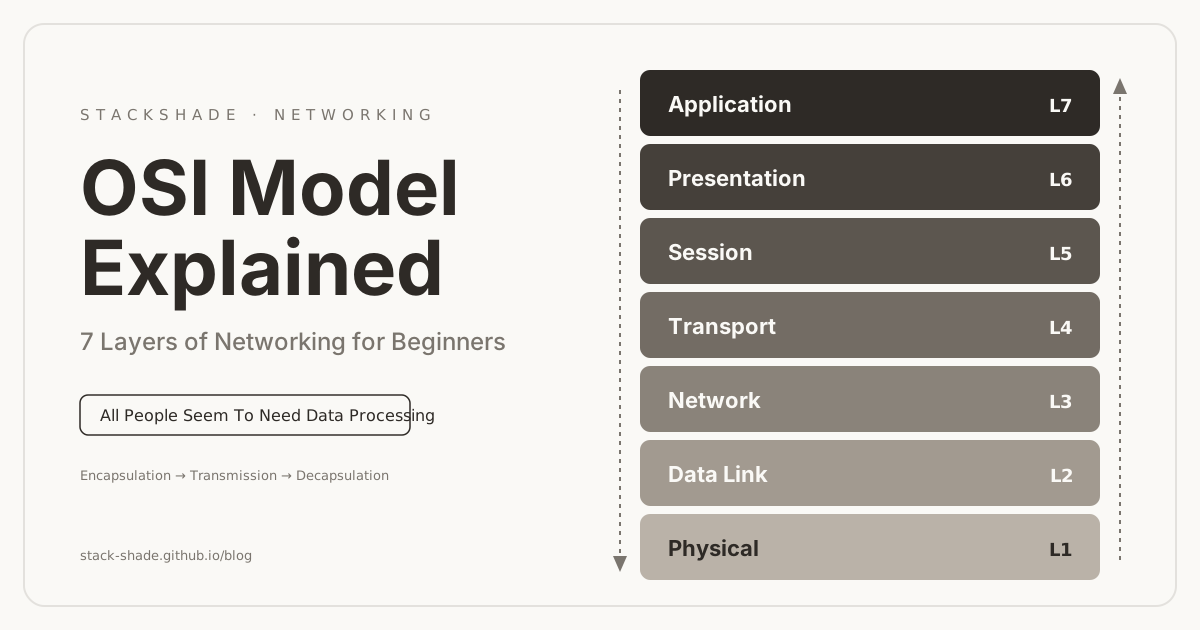
The OSI (Open Systems Interconnection) Model is a conceptual framework that explains how data travels from one device to another over a network. Every message you send — a WhatsApp text, an email, a YouTube video, a webpage request — passes through these seven layers before reaching its destination.
Understanding the OSI model is one of the most important networking concepts because it explains how the Internet works, helps you troubleshoot network issues, and shows up constantly in interviews and certifications like CCNA, CompTIA Network+, GATE, and university exams. This guide comes with interactive explorers, simulators and a quiz — treat it like a mini networking course.
What is the OSI Model & Why Do We Need It?
The OSI Model was developed by the International Organization for Standardization (ISO) in 1984 to standardize communication between different computer systems, regardless of manufacturer or operating system.
Imagine Cisco, Microsoft, Apple, Samsung and Linux all invented their own incompatible ways to communicate — a Windows PC could never talk to a Linux server. The OSI model solves this by defining common standards, dividing communication into 7 independent layers where each layer performs one specific job and communicates only with the layers directly above and below it.
The Seven Layers — Interactive Explorer
The layers are numbered from 7 (closest to the user) down to 1 (closest to the wire). Data moves from Layer 7 down to Layer 1 on the sender, and from Layer 1 up to Layer 7 on the receiver.
Memory Mnemonics
All People Seem To Need Data Processing
Please Do Not Throw Sausage Pizza Away
How Data Flows: A Real Example
Suppose you open Chrome and visit https://google.com. Your request travels from Layer 7 down to Layer 1, crosses the physical medium, then climbs from Layer 1 up to Layer 7 on Google's server. This is called Encapsulation → Transmission → Decapsulation.
Sender ↓
Receiver ↑
Layer-by-Layer Deep Dive
Application Layer
The layer closest to the user — it provides network services to software applications. Important: the Application Layer is NOT the application itself; it's the networking interface apps use. Chrome, Outlook, Gmail and WhatsApp all talk through it.
Analogy: you tell a waiter what food you want — the waiter is the Application Layer.
Presentation Layer — The Translator
Different systems store data differently. This layer converts data into a common format and handles encryption, decryption, compression and decompression. Without it, a Windows computer might not understand data from another system.
Session Layer
Establishes, maintains, synchronizes and terminates communication sessions — exactly like a phone call: connection established → conversation maintained → connection closed.
Transport Layer — End-to-End Delivery
One of the most important layers. Sending a 5 GB movie? The Transport layer divides it into thousands of segments and the receiver reassembles them. It owns reliability, error recovery, flow control, segmentation and reassembly.
TCP — Reliable
Connection-oriented, acknowledgements, guaranteed delivery. Used by banking, logins, email and file downloads.
UDP — Fast
Connectionless, no acknowledgement, no delivery guarantee. Used by live streaming, video calls, gaming and DNS queries.
Network Layer — Routing
Finds the best path across networks using logical addressing. If data must travel from India to the USA, the Network layer decides the route. Uses IP addresses like 192.168.1.20. Devices: routers.
Data Link Layer — Local Delivery
Handles communication inside the local network using permanently assigned MAC addresses like 00:1A:2B:3C:4D:5E. Responsible for framing, error detection, physical addressing and media access control. Devices: switches and bridges.
Physical Layer — Raw Bits
The lowest layer: transmits raw bits — 0 1 0 1 1 0 — as electrical, optical or radio signals. No packets, no IP addresses. Media includes Ethernet cable, fiber optics, Wi-Fi radio waves, Bluetooth and USB. Devices: hubs, repeaters, cables, connectors.
Encapsulation & Decapsulation
As data moves downward through the layers, each layer adds its own header (and sometimes a trailer) — this is encapsulation. At the receiver, headers are stripped off one by one in reverse — decapsulation. Each stage of data has its own name, called a PDU (Protocol Data Unit).
| Layer | PDU | What Gets Added |
|---|---|---|
| Application / Presentation / Session | Data | — |
| Transport | Segment (TCP) / Datagram (UDP) | Ports, sequence numbers, checksum |
| Network | Packet | Source & destination IP |
| Data Link | Frame | Source & destination MAC + FCS trailer |
| Physical | Bits | Signals on the medium |
Devices at Each Layer
| Layer | Devices | Why There |
|---|---|---|
| Application | Proxy Server | Understands full HTTP requests |
| Presentation | SSL Accelerator | Offloads encryption work |
| Session | Gateway | Manages sessions between systems |
| Transport | Firewall | Filters by port & connection state |
| Network | Router | Routes by IP address |
| Data Link | Switch, Bridge | Forwards frames by MAC address |
| Physical | Hub, Repeater | Regenerates raw signals |
OSI vs TCP/IP Model
The OSI model is the theoretical 7-layer teaching model. The modern Internet actually runs on the TCP/IP model, which collapses those seven layers into four practical ones.
| OSI Model | TCP/IP Model |
|---|---|
| 7 layers | 4 layers |
| Theoretical reference model | Practical, implemented model |
| ISO standard (1984) | Internet standard (ARPANET) |
| Used for learning & troubleshooting | Used in real networks today |
Before Data Flows: The TCP Three-Way Handshake
Before your browser sends a single HTTP request, the Transport layer opens a reliable connection with a three-message exchange: SYN → SYN-ACK → ACK. Both sides agree on starting sequence numbers so lost or reordered segments can be detected and fixed later.
How a Webpage Loads — Full OSI Walkthrough
You type www.youtube.com and press Enter. Here's the complete journey:
Your browser creates an HTTP/HTTPS request. DNS resolves youtube.com to an IP address first.
The request is encrypted using TLS so nobody on the path can read it.
A communication session with YouTube's server is established and maintained.
TCP performs the three-way handshake, then divides the request into reliably-delivered segments (port 443).
Each segment gets source and destination IP addresses; routers choose the best path across the Internet.
Frames are built with MAC addresses for hop-to-hop delivery inside each local network.
Frames become electrical, optical or wireless signals and physically travel the medium.
The receiving server then performs the exact reverse — decapsulating from Layer 1 up to Layer 7, reconstructing your original request, processing it, and sending the webpage back through the same pipeline.
The Letter-Delivery Analogy
| Real World | OSI Layer |
|---|---|
| Write the letter | Application |
| Translate the language | Presentation |
| Seal the envelope | Session |
| Courier service | Transport |
| Highway route | Network |
| Local post office | Data Link |
| Road / cable | Physical |
Troubleshooting by Layer (Bottom-Up)
The OSI model's superpower is structured troubleshooting. Pros debug bottom-up, eliminating one layer at a time:
Is the cable plugged in? Wi-Fi on? Any link lights?
Is the NIC working? Connected to the right switch/VLAN?
Do you have an IP? Can you ping the gateway? ping 8.8.8.8?
Is a firewall blocking the port? Is the service listening on 443?
Does DNS resolve? Is the app configured correctly?
Common Interview Questions
Why does the OSI Model have 7 layers?+
To divide networking into modular functions. Each layer does one job and talks only to its neighbors, which makes systems easier to design, maintain, standardize and troubleshoot.
Which layer uses IP addresses?+
The Network layer (Layer 3). IP addresses are logical addresses used for routing packets across networks.
Which layer uses MAC addresses?+
The Data Link layer (Layer 2). MAC addresses are physical addresses burned into network cards, used for delivery inside the local network.
Which layer uses port numbers?+
The Transport layer (Layer 4). Ports identify which application should receive the data — HTTP:80, HTTPS:443, SSH:22, DNS:53.
Which layer handles encryption?+
The Presentation layer (Layer 6) — the translator layer responsible for encryption, decryption, compression and data formatting.
Which layer is responsible for routing?+
The Network layer (Layer 3). Routers examine destination IP addresses and choose the best path.
Which layer provides reliability?+
The Transport layer (Layer 4), primarily through TCP's acknowledgements, retransmissions and sequence numbers.
What device works at Layer 3? Layer 2? Layer 1?+
Router at Layer 3, Switch at Layer 2, Hub and Repeater at Layer 1.
Key Takeaways
- The OSI Model is a 7-layer conceptual framework (ISO, 1984) that standardizes network communication.
- Each layer has one specific responsibility and talks only to its adjacent layers.
- Data flows Layer 7 → Layer 1 when sending (encapsulation) and Layer 1 → Layer 7 when receiving (decapsulation).
- Layer 4 (Transport) gives reliable delivery via TCP or fast delivery via UDP — identified by port numbers.
- Layer 3 (Network) routes packets across the Internet using IP addresses; routers live here.
- Layer 2 (Data Link) handles local delivery using MAC addresses; switches live here.
- Layer 1 (Physical) transmits raw bits over cables, fiber or radio.
- PDUs transform as data descends: Data → Segment → Packet → Frame → Bits.
- OSI is for learning and troubleshooting; the 4-layer TCP/IP model is what the real Internet runs on.
This foundation unlocks the advanced topics: routing protocols, switching, VLANs, firewalls, DNS, VPNs, cloud networking and network security.